---
title: What is the Gravity Sketch web app?
description: Gravity Sketch has had a major overhaul of the web platform, rebuilding the app formerly known as LandingPad from the ground up to improve workflow efficiency and collaboration.
---
[Skip to content](https://help.gravitysketch.com/gravity-sketch-web-app#main-content)

Open main navigation
Close main navigation
How can we help you?
- There are no suggestions because the search field is empty.
1. [Gravity Sketch](https://help.gravitysketch.com/?hsLang=en)
2. [Gravity Sketch for businesses](https://help.gravitysketch.com/gravity-sketch-for-businesses?hsLang=en)
3. [Organizations in Gravity Sketch](https://help.gravitysketch.com/gravity-sketch-for-businesses?hsLang=en#organizations-in-gravity-sketch)
# What is the Gravity Sketch web app?
## Gravity Sketch has rebuilt the web app formerly known as LandingPad to improve workflow efficiency and collaboration.
*All members of an organization will be contacted in the coming weeks with details of their migration date.*
### Transitioning to the new Gravity Sketch web app
The new Gravity Sketch web app is a central hub for managing 3D workflows, files, and teams. It replaces LandingPad to bring a smoother experience to how you organize your work across desktop and VR. You'll find everything you need at [app.gravitysketch.com](http://app.gravitysketch.com) with your existing data ready to go.
### Migrating your account and data
You can log in directly at [app.gravitysketch.com](http://app.gravitysketch.com). You don't need to worry about broken bookmarks or the old LandingPad address, as the system will automatically redirect you to the right place. All your existing data transfers automatically, so your Rooms, Drafts, and files remain exactly as you left them.
For users with a personal account attached to a LandingPad org, your files in this area will be migrated into the "My files" section of the organization in Gravity Sketch Web app.
### What is different from LandingPad?
#### Finding your work
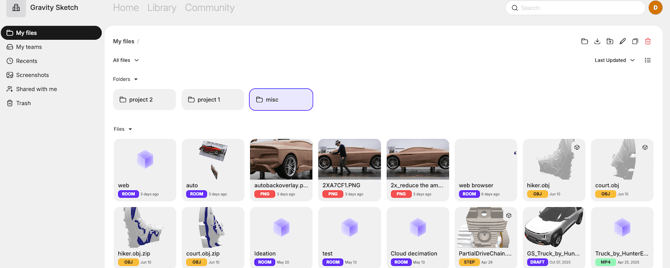
**Organization spaces:** Your organization space is now a dedicated team space that every member of your organization has access to by default.
**Expanded recents:** You can view all your recent files (beyond just the last 30 days) by clicking the Recents tab in the left-hand navigation menu. You will also find advanced filtering options under the "All files" dropdown and sorting options under the "Last Updated" dropdown at the top of the page to help locate specific work.
**Improved search capabilities**: A minimal search bar with new tags and icons helps you distinguish between Rooms, Drafts, and 3D files.
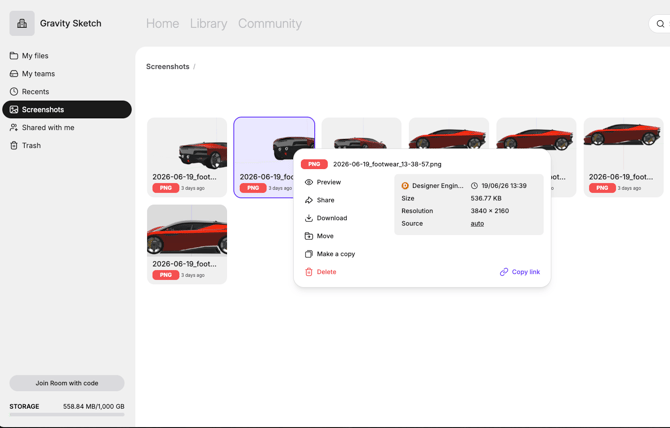
**Dedicated screenshots tab:** Screenshots no longer clutter your main files and instead save automatically to the new Screenshots tab in the left-hand navigation menu. In this tab you will also find links to the content a screenshot was taken from.
#### Managing your files
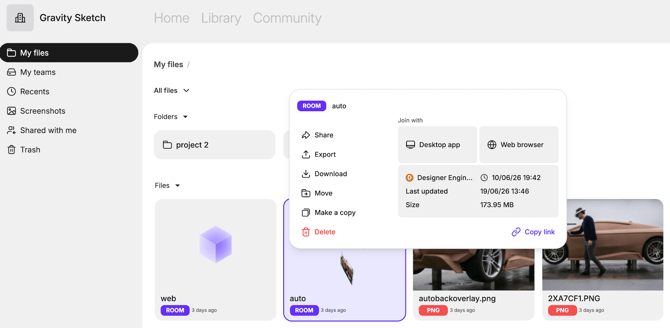
**Updated right-click menu:** By right-clicking any file, folder, or Room, you will open a right-click modal. From this menu, you can download entire folders, make copies of Rooms, share non-native files like FBXs, or join Rooms directly via your web browser without putting on a headset.
**File metadata:** Detailed information including the creator, file size, and creation date is now clearly visible directly inside the right-click modal. There is also a new "Go to file location" link in this menu to help you pinpoint exactly where a file lives.
**Exporting:** Cloud Exports no longer have a dedicated tab on the side menu. Instead, exports will now save directly to the specific location you choose.
**External teams:** If you are invited to a team hosted by another organization, you will now find it by clicking the "Shared with me" tab in the left-hand navigation menu.
#### Collaborating with others
**Invitations:** When invited to an organization, existing users can now choose to accept or decline the invitation rather than joining automatically.
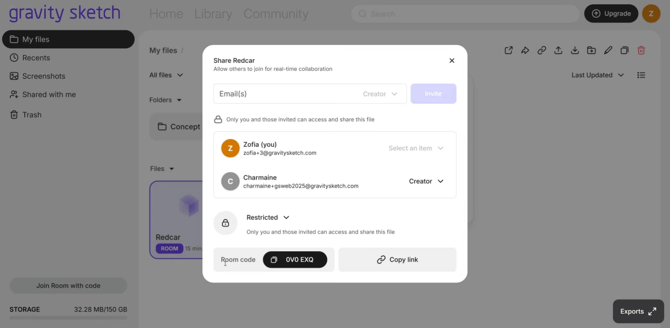
**License visibility:** When you click into a specific team to open the Team share modal, you can now hover over a user's role to see the specific license type of all members and guests.
### Updates for administrators
**Guest access control:** Organization admins can control whether individual files can be shared with users outside the organization. This toggle is found by clicking the Admin tab in the left-hand navigation menu, selecting General, and scrolling to the Guest access section.
**Invitation management:** Admins can resend or revoke pending user invitations by clicking the Admin tab and selecting People.
**Team management**: Team and Organization admins can now permanently delete teams directly from the bottom of the Team share modal.
### Deprecated web features
Some legacy features are no longer available on the web browser:
- Gravity Sketch's stock tutorial videos, assets, and community designers are now accessed exclusively in VR. Any tutorial videos custom to the organization can be found as usual in the Tutorials folder.
- The stock asset library is also removed from the web, though custom organization asset libraries are planned for a future update.
If you have any questions or run into issues during your transition, please contact the support team at [support@gravitysketch.com](mailto:support@gravitysketch.com)
- [Getting started](https://help.gravitysketch.com/getting-started?hsLang=en#main-content)
- [Basic VR Controls](https://help.gravitysketch.com/getting-started?hsLang=en#basic-vr-controls)
- [Starter Resources](https://help.gravitysketch.com/getting-started?hsLang=en#starter-resources)
- [VR Guide](https://help.gravitysketch.com/getting-started?hsLang=en#vr-guide)
- [PC & VR Setup](https://help.gravitysketch.com/getting-started?hsLang=en#pc-vr-setup)
- [Troubleshooting](https://help.gravitysketch.com/troubleshooting?hsLang=en#main-content)
- [Troubleshooting](https://help.gravitysketch.com/troubleshooting?hsLang=en#troubleshooting)
- [FAQs](https://help.gravitysketch.com/troubleshooting?hsLang=en#faqs)
- [What's new?](https://help.gravitysketch.com/whats-new?hsLang=en#main-content)
- [Release Notes](https://help.gravitysketch.com/whats-new?hsLang=en#release-notes)
- [Product Updates & Releases](https://help.gravitysketch.com/whats-new?hsLang=en#product-updates-releases)
- [Creation tools](https://help.gravitysketch.com/creation-tools?hsLang=en#main-content)
- [Explore Workspace](https://help.gravitysketch.com/creation-tools?hsLang=en#explore-workspace)
- [Interact with Objects](https://help.gravitysketch.com/creation-tools?hsLang=en#interact-with-objects)
- [Sketching and Basic Editing](https://help.gravitysketch.com/creation-tools?hsLang=en#sketching-and-basic-editing)
- [Advanced Control](https://help.gravitysketch.com/creation-tools?hsLang=en#advanced-control)
- [SubD Editing](https://help.gravitysketch.com/creation-tools?hsLang=en#subd-editing)
- [File Management](https://help.gravitysketch.com/creation-tools?hsLang=en#file-management)
- [Beta Menu](https://help.gravitysketch.com/creation-tools?hsLang=en#beta-menu)
- [Quick Tips](https://help.gravitysketch.com/creation-tools?hsLang=en#quick-tips)
- [Import & export](https://help.gravitysketch.com/import-export?hsLang=en)
- [Collaboration](https://help.gravitysketch.com/collaboration?hsLang=en#main-content)
- [Collaboration in AR/VR](https://help.gravitysketch.com/collaboration?hsLang=en#collaboration-in-ar-vr)
- [Collaboration on Desktop](https://help.gravitysketch.com/collaboration?hsLang=en#collaboration-on-desktop)
- [Presentation](https://help.gravitysketch.com/collaboration?hsLang=en#presentation)
- [Data & security](https://help.gravitysketch.com/data-security?hsLang=en)
- [Gravity Sketch for businesses](https://help.gravitysketch.com/gravity-sketch-for-businesses?hsLang=en#main-content)
- [Organizations in Gravity Sketch](https://help.gravitysketch.com/gravity-sketch-for-businesses?hsLang=en#organizations-in-gravity-sketch)
- [Enterprise Features](https://help.gravitysketch.com/gravity-sketch-for-businesses?hsLang=en#enterprise-features)
- [Learn Gravity Sketch](https://help.gravitysketch.com/learn-gravity-sketch?hsLang=en#main-content)
- [Certification](https://help.gravitysketch.com/learn-gravity-sketch?hsLang=en#certification)
- [Community](https://help.gravitysketch.com/learn-gravity-sketch?hsLang=en#community)
- [Education](https://help.gravitysketch.com/learn-gravity-sketch?hsLang=en#education)
- [Labs](https://help.gravitysketch.com/labs?hsLang=en#main-content)
- [About Labs](https://help.gravitysketch.com/labs?hsLang=en#about-labs)
[](http://gravitysketch.com)
Copyright © 2026, Gravity Sketch