
Gravity Sketch 7.0 is available from November 24. It's built to make your work faster, your collaboration more reliable, and your edits more precise, whether you're in a headset, at your desk, or on a tablet.
At the heart of 7.0 is a new collaboration engine and major performance improvements that touch almost every part of the app. On top of that, VR gets Bézier curves and precise transforms.
Because the new collaboration engine and performance improvements run through the whole app, sketches open sooner, Rooms stay in sync, and large models with lots of parts feel lighter to work with. You don't need to change anything about how you work to feel the difference.
The update is available to all users across VR and the Screen app (desktop and browser). To collaborate in the same Room, everyone needs to be on 7.0 or later.
Smoother, more reliable collaboration
Every edit in a Room, from anyone in it, now syncs through a new collaboration engine. It merges changes made at the same time automatically, so multiple people can work together in the same Room at once more seamlessly, including editing the environment at the same time.
Rooms stay in sync more reliably, with fewer stuck or out-of-sync sessions. If your connection drops, it's now smoother to rejoin the Room.
A few other improvements come with the new engine:
- Layers: Layers now keep the same order for everyone, and any layer can be reordered or grouped, whoever created it. A layer someone is actively using can't be deleted from under them.
- Undo and redo: Rebuilt on the new engine, and now covers deleting layers too
Faster and more stable, especially with large models
Optimizations across the app mean large sketches load faster, and duplicating, mirroring, and importing lots of objects is quicker. Selecting and moving many objects at once feels smoother too.
In internal tests, sketches loaded 5 to 13 times faster and peak memory use dropped by 50%. Lower memory use means fewer crashes, particularly when you're running Gravity Sketch in the browser.
These improvements are on by default in VR and on Screen, with nothing to set up.
New in VR
Bézier curves
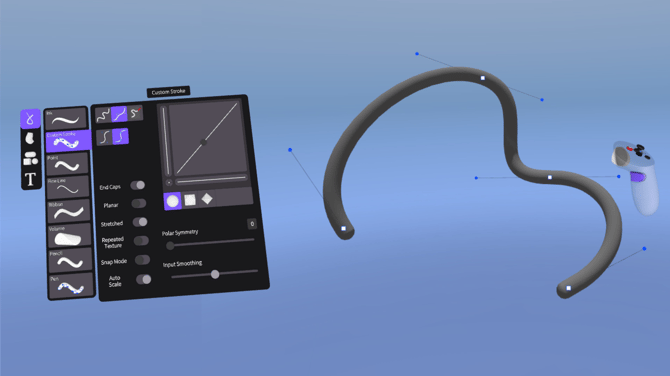
Strokes can now be drawn as Bézier curves alongside the existing B-spline curves. Anchor points sit directly on the line, and you can adjust, add, or remove handles to control the shape of each curve.
Tap the trigger for a sharp point, or hold and drag for a curved one. Switch to Bézier from your off-hand menu while the stroke tool is active.
Precise transforms
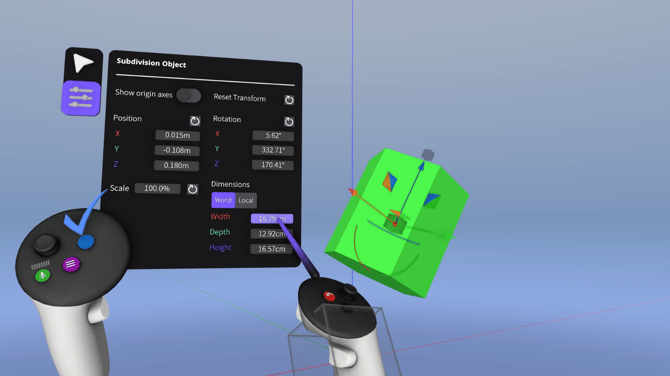
Set an object's exact position, rotation, and scale by typing values into the object info panel, or drag on a value to adjust it with a live preview. Reset transform returns the object to its original position, rotation, and scale.
More ways to shape and move
- Separate on cut: The Edge cut tool can now cut and split a surface in a single action, so you can pull the pieces apart right away
- One-handed scaling: Use the thumbstick while grabbing an object to scale it. It's now out of Labs and available to everyone.
- Snap to origin: Snap to an object's own origin, including with the gumball
- Projected strokes: A new brush menu toggle lets you project strokes onto a surface or inside it
Small touches
- Mute your mic when you're working alone, handy for video recordings
- Collaborators' avatar colors now show as a slim ring on each controller handle, instead of tinting the whole controller and avatar
- Menus and controllers have a refreshed look, with soft shadows under buttons and text
New on Screen
Trackpad
On a Mac, you can now pan and pinch to zoom with your trackpad.
New headset support
- Steam Frame: Full support
- PC VR: Headsets now run through OpenXR instead of SteamVR, so controller models line up better with your hands, and the Vive Cosmos is recognized properly
- Pico 4 Ultra: Correct controller models
- Meta: More lifelike controller visuals and smoother haptics
Good to know
- Because of the new collaboration engine, everyone in a Room needs to be on 7.0 or later to work together. Anyone on an earlier version of the app will need to update before joining a Room.
- For the full list of changes and fixes, see 7.0 release notes on each app's platform storefront.