---
title: October 2024
description: Gravity Sketch Oct 2025 update adds Quest 3 passthrough, MX Ink support, Quick Access tools, Screen Collab fixes, and more
---
[Skip to content](https://help.gravitysketch.com/hc/en-us/articles/23306681943581-october-2024#main-content)

Open main navigation
Close main navigation
How can we help you?
- There are no suggestions because the search field is empty.
1. [Gravity Sketch](https://help.gravitysketch.com/?hsLang=en)
2. [What's new?](https://help.gravitysketch.com/whats-new?hsLang=en)
3. [Release Notes](https://help.gravitysketch.com/whats-new?hsLang=en#release-notes)
# October 2024
## GS 6.3.7 (October 1)
#### VR
#### 🚀 Features & Improvements
- Passthrough depth occlusion on standalone Quest 3
- Quest 2 and Quest 3 support for Logitech MX Ink Stylus
#### 🐛 Bug Fixes
- App launcher now supports proxies that point to more than one IP address
- Fixed extremely small measurement readouts on previewing some file imports
- Fixed not being able to complete Google login in the web browser on standalone headsets
- For OBJ exports, files inside the .zip folder now match the file name rather than being named as unintelligible file IDs.
- Miscellaneous medium/low impact bug fixes
### GS 6.3.8 (October 21)
#### VR
#### 🚀 Features & Improvements
- Improved Quick Access inside menu: this now includes Export, Share, Save, Screenshot, Exit and Help buttons.
- Added an outside panel to Quick Access menu (access this by rotating the non-drawing hand inwards, as though looking at a wristwatch). This now gives quick access to the following buttons: Find My Sketch, Vertical Lock, Mirror, Home Orientation, Grid and Layers.
- Updated the UI for several sketch menu buttons.
- The Grid option has been moved from the beta panel to the main Sketching Aid menu.
- Self-onboarding rooms in the Learn tab now remain accessible when not logged into LandingPad.
#### 🐛 Bug Fixes
- Fixed extra edge duplications when using smart move on SubD edges.
- Improved positioning of rigged models on export.
- Restored virtual headset highlight on passthrough gesture.
- Fixed failure on converting a template sketch into a Collab room twice in the same session.
- Fixed UI overlap when toggling planar mode on a group edit.
- Fixed some memory issues caused by thickened surfaces.
- FBX exports now communicate creases properly when opened in Blender 4.2.
#### Screen Collab
#### 🚀 Features & Improvements
- Made the navigation cube purple.
#### 🐛 Bug Fixes
- Fixed section view highlight becoming excessively wide when seen in Screen Collab.
- Fixed error message when reaching max cap of users in a room.
- Rejoining a password-protected room no longer hangs.
### Ops v1.23 (October 7)
### 🚀 Features & Improvements
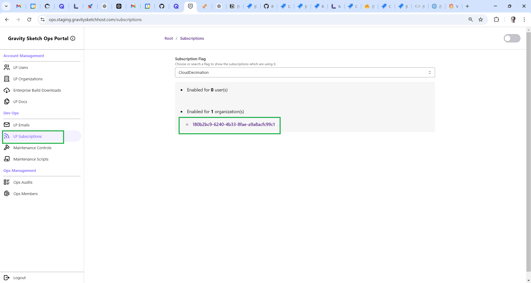
- Added ability to look up numbers on how many users and organizations are using specific feature flag with list of their IDs bellow:
### 🐛 Bug Fixes
- Fix issue on deleting org, user clicking deleting org triggered error and stayed on org info page.
- Fix issue on add members, if user attempts to add more than 10 users to a team as a team members in one go, error will trigger and the action will fail.
- Fix issue on deleting members, if user attempts to delete more than 10 users from a team as a team members in one go, error will trigger and the action will fail
### LP v1.23 (October 7)
#### 🚀 Features & Improvements
- \*\*New layout for Teams management will be enabled on Monday 7th of October
-\*\* We \*\*\*\*collapsed Guest Teams into the current Teams structure, and enabled Org Admins to create **Teams which can be shared externally** (which can be shared with anyone with a LP account) vs. **Teams which can only be shared internally** within the Org
- As part of this migration, we addressed some usability, security, and use case concerns/feedback that we have gathered for Guest Teams
- If any org Team is *closed* for external sharing, only members of the org can be invited to this team.
- If any org Team is *opened* for external sharing, any user with existing LP account can be invited to this team as a Guest regardless of their org membership or if the user is a community user and not a member of any org at all.
- Each team where user has a membership is accessible via new “My Teams” tab
- In “My Teams” tab, a user has not just visibility over all Internal and External teams they are member of, but also availability to “favourite” specific teams for even faster access from left side menu.
- Only org Admin and Team Admin can decide if the team will be opened or closed for External sharing
- If team has been previously opened for External sharing (contains Guest members), changing Team to be Internal only will force remove all Guest users from Team.
- We introduce ability to delete empty teams
### 🐛 Bug Fixes
N/A
### Ops 1.24 (October 14)
### 🐛 Bug Fixes
N/A
### LP 1.24 (October 14)
#### 🚀 Features & Improvements
- **Room-level access control for Collab Rooms within org has been released for all organisations.** For full information about this project please see \*\*\*\*[Permissions Based Sharing of Collab Rooms](https://www.notion.so/Permissions-Based-Sharing-of-Collab-Rooms-dfff48a59d3a482ba70d1d87d23d3111?pvs=21)
### 🐛 Bug Fixes
- Fix issue on adding member as Reviewer License.
- Tweak warning message if user attempts to log in to an organisational account locked to an org which has been expired
- Implemented a warning popup if user is guest member of external team and the host org of this team got expired
- Implemented a warning popup if user is a member of multiple orgs which expired and they are trying to access the url to the specific expired org
### LP 1.25 (October 21)
#### 🐛 Bug Fixes
- Implemented missing audit when org admin denies user's request to join an org
### Ops 1.25 (October 21)
#### 🐛 Bug Fixes
- Implemented missing audit when GS user denies user's request to join an org
- Fixed broken Bulk extend Licences flow
### LP v1.26 (October 31)
#### 🐛 Bug Fixes
- Fix issue on Expired on date in Cloud Export Beta.
- Fixed scrolling issue on Cloud Export (Beta) page and “Shared with me” tab
- Fixed issue during “Forgot password” workflow from Manage Account section
### Ops v1.26 (October 31)
#### 🐛 Bug Fixes
- Fix issue on receiving error message when creating a new team with the same name as an existing team.
### GS 6.3.8 re-release (Quest only) (October 28)
#### 🐛 Bug Fixes
- Fix memory leak and frequent OOM crashes
- [Getting started](https://help.gravitysketch.com/getting-started?hsLang=en#main-content)
- [Basic VR Controls](https://help.gravitysketch.com/getting-started?hsLang=en#basic-vr-controls)
- [Starter Resources](https://help.gravitysketch.com/getting-started?hsLang=en#starter-resources)
- [VR Guide](https://help.gravitysketch.com/getting-started?hsLang=en#vr-guide)
- [PC & VR Setup](https://help.gravitysketch.com/getting-started?hsLang=en#pc-vr-setup)
- [Troubleshooting](https://help.gravitysketch.com/troubleshooting?hsLang=en#main-content)
- [Troubleshooting](https://help.gravitysketch.com/troubleshooting?hsLang=en#troubleshooting)
- [FAQs](https://help.gravitysketch.com/troubleshooting?hsLang=en#faqs)
- [What's new?](https://help.gravitysketch.com/whats-new?hsLang=en#main-content)
- [Release Notes](https://help.gravitysketch.com/whats-new?hsLang=en#release-notes)
- [Product Updates & Releases](https://help.gravitysketch.com/whats-new?hsLang=en#product-updates-releases)
- [Creation tools](https://help.gravitysketch.com/creation-tools?hsLang=en#main-content)
- [Explore Workspace](https://help.gravitysketch.com/creation-tools?hsLang=en#explore-workspace)
- [Interact with Objects](https://help.gravitysketch.com/creation-tools?hsLang=en#interact-with-objects)
- [Sketching and Basic Editing](https://help.gravitysketch.com/creation-tools?hsLang=en#sketching-and-basic-editing)
- [Advanced Control](https://help.gravitysketch.com/creation-tools?hsLang=en#advanced-control)
- [SubD Editing](https://help.gravitysketch.com/creation-tools?hsLang=en#subd-editing)
- [File Management](https://help.gravitysketch.com/creation-tools?hsLang=en#file-management)
- [Beta Menu](https://help.gravitysketch.com/creation-tools?hsLang=en#beta-menu)
- [Quick Tips](https://help.gravitysketch.com/creation-tools?hsLang=en#quick-tips)
- [Import & export](https://help.gravitysketch.com/import-export?hsLang=en)
- [Collaboration](https://help.gravitysketch.com/collaboration?hsLang=en#main-content)
- [Collaboration in AR/VR](https://help.gravitysketch.com/collaboration?hsLang=en#collaboration-in-ar-vr)
- [Collaboration on Desktop](https://help.gravitysketch.com/collaboration?hsLang=en#collaboration-on-desktop)
- [Presentation](https://help.gravitysketch.com/collaboration?hsLang=en#presentation)
- [Data & security](https://help.gravitysketch.com/data-security?hsLang=en)
- [Gravity Sketch for businesses](https://help.gravitysketch.com/gravity-sketch-for-businesses?hsLang=en#main-content)
- [Organizations in Gravity Sketch](https://help.gravitysketch.com/gravity-sketch-for-businesses?hsLang=en#organizations-in-gravity-sketch)
- [Enterprise Features](https://help.gravitysketch.com/gravity-sketch-for-businesses?hsLang=en#enterprise-features)
- [Learn Gravity Sketch](https://help.gravitysketch.com/learn-gravity-sketch?hsLang=en#main-content)
- [Certification](https://help.gravitysketch.com/learn-gravity-sketch?hsLang=en#certification)
- [Community](https://help.gravitysketch.com/learn-gravity-sketch?hsLang=en#community)
- [Education](https://help.gravitysketch.com/learn-gravity-sketch?hsLang=en#education)
- [Labs](https://help.gravitysketch.com/labs?hsLang=en#main-content)
- [About Labs](https://help.gravitysketch.com/labs?hsLang=en#about-labs)
[](http://gravitysketch.com)
Copyright © 2026, Gravity Sketch