---
title: Extrusion
description: Learn how to extrude in Gravity Sketch by manipulating control points, edges, and faces of Planar Volumes or SubD objects for custom geometry.
---
[Skip to content](https://help.gravitysketch.com/hc/en-us/articles/5902639247901-extrusion#main-content)

Open main navigation
Close main navigation
How can we help you?
- There are no suggestions because the search field is empty.
1. [Gravity Sketch](https://help.gravitysketch.com/?hsLang=en)
2. [Creation tools](https://help.gravitysketch.com/creation-tools?hsLang=en)
3. [SubD Editing](https://help.gravitysketch.com/creation-tools?hsLang=en#subd-editing)
# Extrusion
#### Introduction
Within Gravity Sketch extrusion can be used to manipulate the control points, edges and faces of an object to achieve modified objects.
#### Extrude Planar Volume
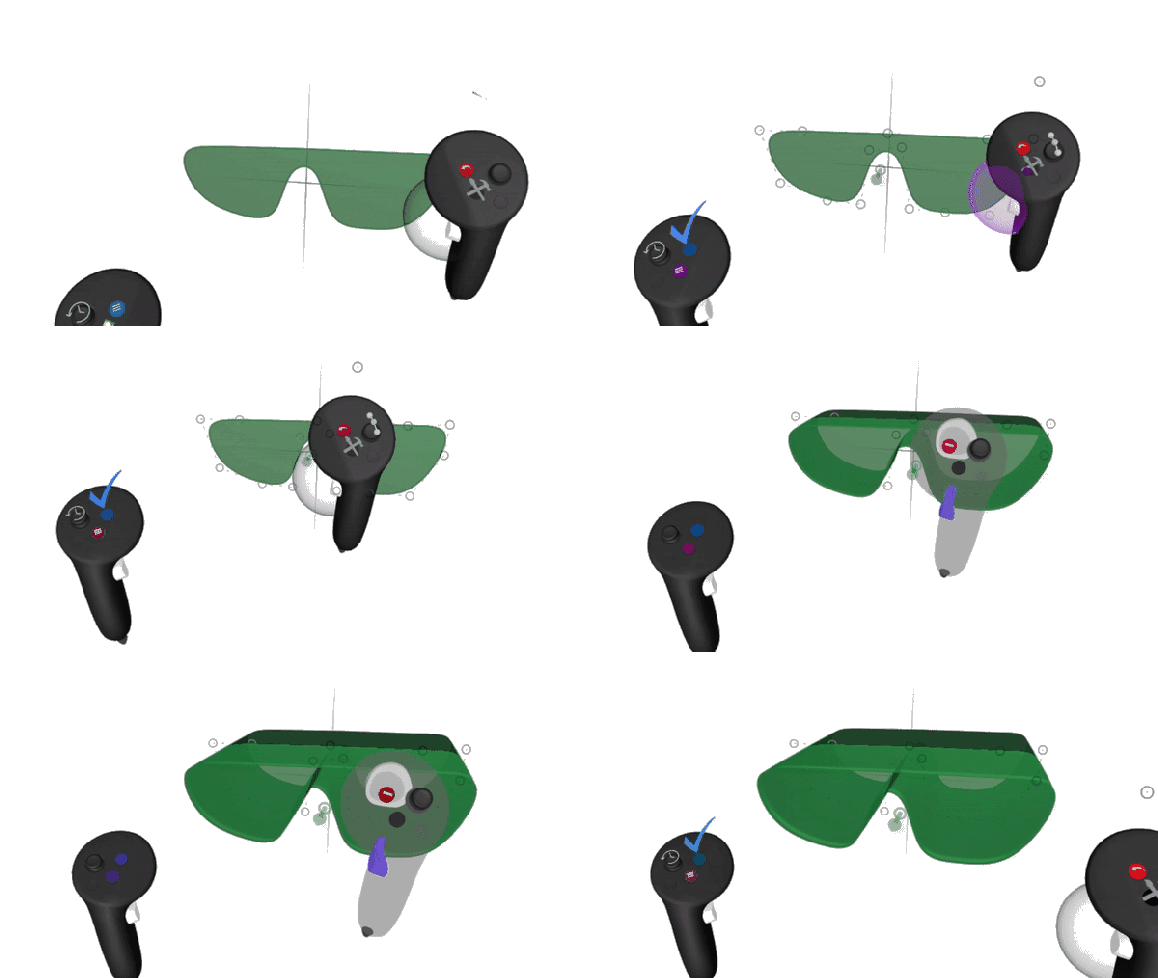
1\. Create a Planar Volume and enter the Edit mode
2\. Grab the green arrow on the geometry and pull it to extrude
#### Extrude SubD object
When it comes to SubD objects there won't be any arrows to pull. The process is more similar to the [duplication of objects](https://help.gravitysketch.com/hc/en-us/articles/5912759232925-Duplicate-Objects?hsLang=en), only here you'll be duplicating edges, faces, and control points while in the [Edit Mode](https://help.gravitysketch.com/hc/en-us/articles/5902620122269#:~:text=Enter/Exit%20Edit%20Mode).
### Extrude an edge or face
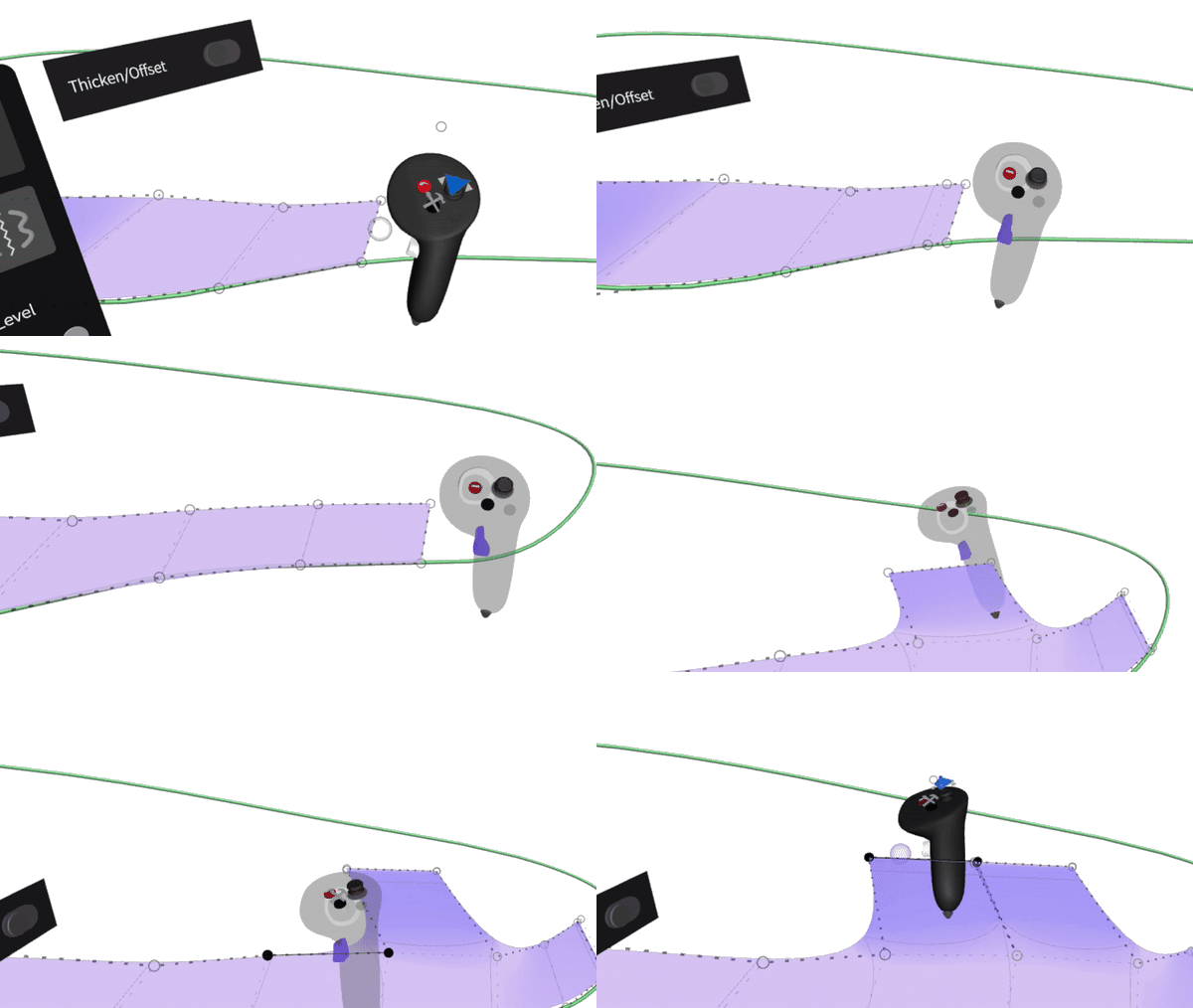
To extrude an edge of the SubD object:
1\. Grab the object and select the blue menu button
2\. Grab the edge/face you'd like to extrude
3\. Press the front trigger and pull the edge/face in the wanted direction (keep pressing the front trigger to add additional sets of control points)
### Extrude by grabbing adjacent vertices
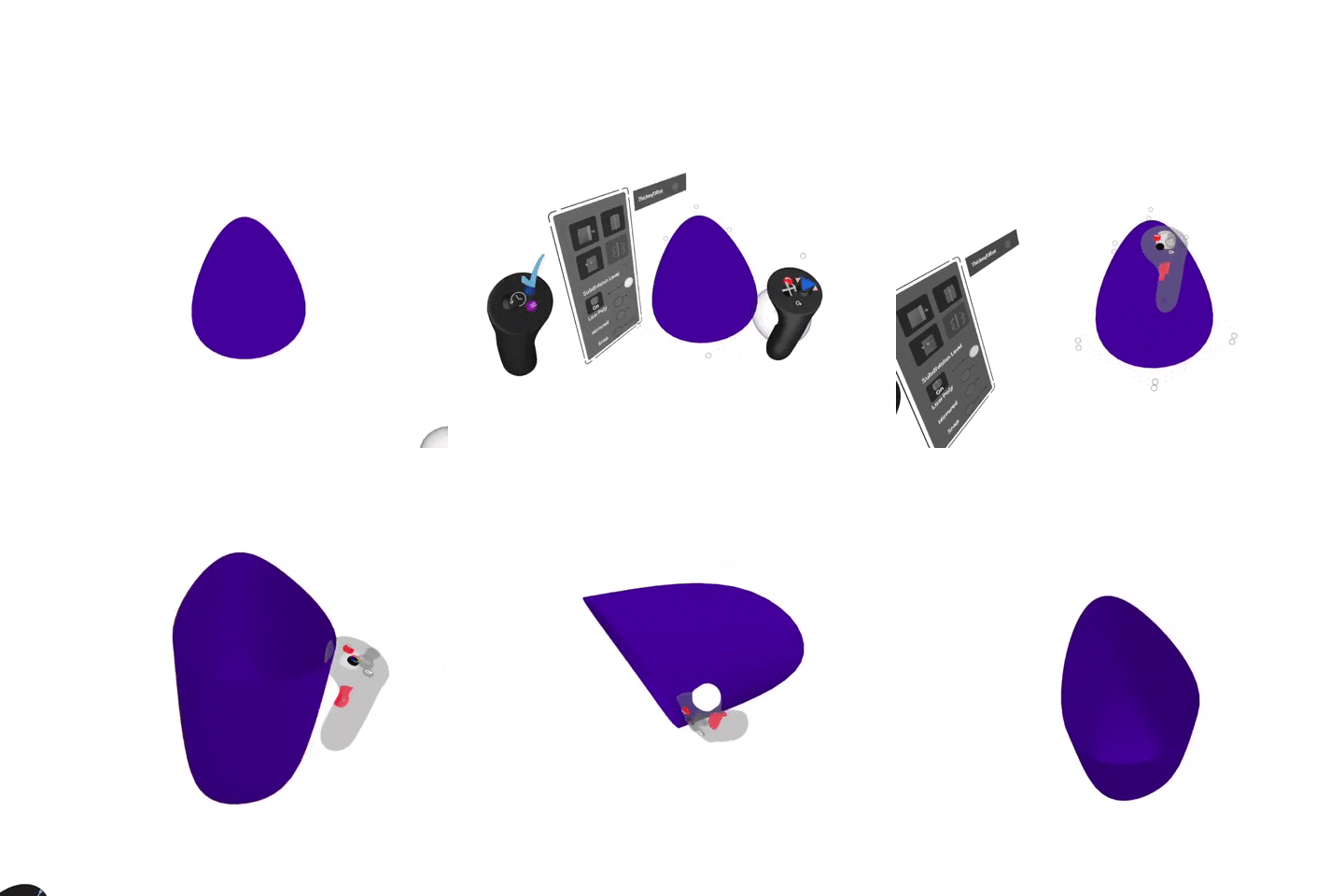
You can now also extrude edges on a subdivision (SubD) object by grabbing adjacent control points without grabbing the edges themselves.
1\. Grab the object and select the Blue Menu button
2\. Grab and hold control points around the individual face you'd like to extrude or you can extrude outer edges by grabbing all edge loops as shown below
3\. Squeeze the front trigger and pull in the wanted direction
4\. Release all buttons to end extrusion (keep pressing the front trigger to add additional sets of control points)
- [Getting started](https://help.gravitysketch.com/getting-started?hsLang=en#main-content)
- [Basic VR Controls](https://help.gravitysketch.com/getting-started?hsLang=en#basic-vr-controls)
- [Starter Resources](https://help.gravitysketch.com/getting-started?hsLang=en#starter-resources)
- [VR Guide](https://help.gravitysketch.com/getting-started?hsLang=en#vr-guide)
- [PC & VR Setup](https://help.gravitysketch.com/getting-started?hsLang=en#pc-vr-setup)
- [Troubleshooting](https://help.gravitysketch.com/troubleshooting?hsLang=en#main-content)
- [Troubleshooting](https://help.gravitysketch.com/troubleshooting?hsLang=en#troubleshooting)
- [FAQs](https://help.gravitysketch.com/troubleshooting?hsLang=en#faqs)
- [What's new?](https://help.gravitysketch.com/whats-new?hsLang=en#main-content)
- [Release Notes](https://help.gravitysketch.com/whats-new?hsLang=en#release-notes)
- [Product Updates & Releases](https://help.gravitysketch.com/whats-new?hsLang=en#product-updates-releases)
- [Creation tools](https://help.gravitysketch.com/creation-tools?hsLang=en#main-content)
- [Explore Workspace](https://help.gravitysketch.com/creation-tools?hsLang=en#explore-workspace)
- [Interact with Objects](https://help.gravitysketch.com/creation-tools?hsLang=en#interact-with-objects)
- [Sketching and Basic Editing](https://help.gravitysketch.com/creation-tools?hsLang=en#sketching-and-basic-editing)
- [Advanced Control](https://help.gravitysketch.com/creation-tools?hsLang=en#advanced-control)
- [SubD Editing](https://help.gravitysketch.com/creation-tools?hsLang=en#subd-editing)
- [File Management](https://help.gravitysketch.com/creation-tools?hsLang=en#file-management)
- [Beta Menu](https://help.gravitysketch.com/creation-tools?hsLang=en#beta-menu)
- [Quick Tips](https://help.gravitysketch.com/creation-tools?hsLang=en#quick-tips)
- [Import & export](https://help.gravitysketch.com/import-export?hsLang=en)
- [Collaboration](https://help.gravitysketch.com/collaboration?hsLang=en#main-content)
- [Collaboration in AR/VR](https://help.gravitysketch.com/collaboration?hsLang=en#collaboration-in-ar-vr)
- [Collaboration on Desktop](https://help.gravitysketch.com/collaboration?hsLang=en#collaboration-on-desktop)
- [Presentation](https://help.gravitysketch.com/collaboration?hsLang=en#presentation)
- [Data & security](https://help.gravitysketch.com/data-security?hsLang=en)
- [Gravity Sketch for businesses](https://help.gravitysketch.com/gravity-sketch-for-businesses?hsLang=en#main-content)
- [Organizations in Gravity Sketch](https://help.gravitysketch.com/gravity-sketch-for-businesses?hsLang=en#organizations-in-gravity-sketch)
- [Enterprise Features](https://help.gravitysketch.com/gravity-sketch-for-businesses?hsLang=en#enterprise-features)
- [Learn Gravity Sketch](https://help.gravitysketch.com/learn-gravity-sketch?hsLang=en#main-content)
- [Certification](https://help.gravitysketch.com/learn-gravity-sketch?hsLang=en#certification)
- [Community](https://help.gravitysketch.com/learn-gravity-sketch?hsLang=en#community)
- [Education](https://help.gravitysketch.com/learn-gravity-sketch?hsLang=en#education)
- [Labs](https://help.gravitysketch.com/labs?hsLang=en#main-content)
- [About Labs](https://help.gravitysketch.com/labs?hsLang=en#about-labs)
[](http://gravitysketch.com)
Copyright © 2026, Gravity Sketch