---
title: The General Menu
description: Learn how to use the Options Menu in Gravity Sketch to adjust settings, manage files, import assets, view layers, and access tutorials.
---
[Skip to content](https://help.gravitysketch.com/hc/en-us/articles/5912615513245-the-options-menu#main-content)

Open main navigation
Close main navigation
How can we help you?
- There are no suggestions because the search field is empty.
1. [Gravity Sketch](https://help.gravitysketch.com/?hsLang=en)
2. [Getting started](https://help.gravitysketch.com/getting-started?hsLang=en)
3. [Basic VR Controls](https://help.gravitysketch.com/getting-started?hsLang=en#basic-vr-controls)
# The General Menu
## An overview on how to use the VR General Menu
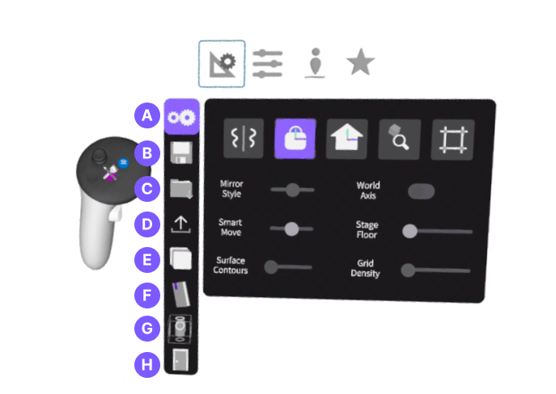
The Options Menu can be accessed by pressing the blue button on the non-drawing hand. From this menu, you can access tabs that will lead you to different settings and options described below.
---
### Options Menu tabs
This is where you will be able to:
**A.** Access settings and preferences **([Sketching Aid](https://help.gravitysketch.com/hc/en-us/articles/5912515894173?hsLang=en), [Preferences](https://help.gravitysketch.com/hc/en-us/articles/5912553144733?hsLang=en), [Workspace](https://help.gravitysketch.com/hc/en-us/articles/5912554835101?hsLang=en), [Beta](https://help.gravitysketch.com/hc/en-us/articles/6187053651613?hsLang=en))**
**B. [Save](https://help.gravitysketch.com/hc/en-us/articles/5912513701789?hsLang=en)**your file
**C.** Import **[reference images and prefabs](https://help.gravitysketch.com/hc/en-us/articles/5912557661981?hsLang=en)**
**D. [Export](https://help.gravitysketch.com/hc/en-us/articles/5912513701789?hsLang=en)** your file
**E.** View your **[layers](https://help.gravitysketch.com/hc/en-us/articles/5912596433309?hsLang=en)**
**F.** Access **[tutorials and resources](https://help.gravitysketch.com/hc/en-us/articles/5887375182237-Tutorials#:~:text=In%2Dapp%20tutorials-,VR%20In%2Dapp%20tutorials,-1.%20Open%20up)**
**G.** View your **[orthographic viewports](https://help.gravitysketch.com/hc/en-us/articles/5912594383773?hsLang=en)**
**H.** Exit back to the lobby.
---
#### Switch between Options
To switch between the tabs, simply point to any of the icons to the left and pull the trigger on the drawing hand controller, to access the options in each tab.
- [Getting started](https://help.gravitysketch.com/getting-started?hsLang=en#main-content)
- [Basic VR Controls](https://help.gravitysketch.com/getting-started?hsLang=en#basic-vr-controls)
- [Starter Resources](https://help.gravitysketch.com/getting-started?hsLang=en#starter-resources)
- [VR Guide](https://help.gravitysketch.com/getting-started?hsLang=en#vr-guide)
- [PC & VR Setup](https://help.gravitysketch.com/getting-started?hsLang=en#pc-vr-setup)
- [Troubleshooting](https://help.gravitysketch.com/troubleshooting?hsLang=en#main-content)
- [Troubleshooting](https://help.gravitysketch.com/troubleshooting?hsLang=en#troubleshooting)
- [FAQs](https://help.gravitysketch.com/troubleshooting?hsLang=en#faqs)
- [What's new?](https://help.gravitysketch.com/whats-new?hsLang=en#main-content)
- [Release Notes](https://help.gravitysketch.com/whats-new?hsLang=en#release-notes)
- [Product Updates & Releases](https://help.gravitysketch.com/whats-new?hsLang=en#product-updates-releases)
- [Creation tools](https://help.gravitysketch.com/creation-tools?hsLang=en#main-content)
- [Explore Workspace](https://help.gravitysketch.com/creation-tools?hsLang=en#explore-workspace)
- [Interact with Objects](https://help.gravitysketch.com/creation-tools?hsLang=en#interact-with-objects)
- [Sketching and Basic Editing](https://help.gravitysketch.com/creation-tools?hsLang=en#sketching-and-basic-editing)
- [Advanced Control](https://help.gravitysketch.com/creation-tools?hsLang=en#advanced-control)
- [SubD Editing](https://help.gravitysketch.com/creation-tools?hsLang=en#subd-editing)
- [File Management](https://help.gravitysketch.com/creation-tools?hsLang=en#file-management)
- [Beta Menu](https://help.gravitysketch.com/creation-tools?hsLang=en#beta-menu)
- [Quick Tips](https://help.gravitysketch.com/creation-tools?hsLang=en#quick-tips)
- [Import & export](https://help.gravitysketch.com/import-export?hsLang=en)
- [Collaboration](https://help.gravitysketch.com/collaboration?hsLang=en#main-content)
- [Collaboration in AR/VR](https://help.gravitysketch.com/collaboration?hsLang=en#collaboration-in-ar-vr)
- [Collaboration on Desktop](https://help.gravitysketch.com/collaboration?hsLang=en#collaboration-on-desktop)
- [Presentation](https://help.gravitysketch.com/collaboration?hsLang=en#presentation)
- [Data & security](https://help.gravitysketch.com/data-security?hsLang=en)
- [Gravity Sketch for businesses](https://help.gravitysketch.com/gravity-sketch-for-businesses?hsLang=en#main-content)
- [Organizations in Gravity Sketch](https://help.gravitysketch.com/gravity-sketch-for-businesses?hsLang=en#organizations-in-gravity-sketch)
- [Enterprise Features](https://help.gravitysketch.com/gravity-sketch-for-businesses?hsLang=en#enterprise-features)
- [Learn Gravity Sketch](https://help.gravitysketch.com/learn-gravity-sketch?hsLang=en#main-content)
- [Certification](https://help.gravitysketch.com/learn-gravity-sketch?hsLang=en#certification)
- [Community](https://help.gravitysketch.com/learn-gravity-sketch?hsLang=en#community)
- [Education](https://help.gravitysketch.com/learn-gravity-sketch?hsLang=en#education)
- [Labs](https://help.gravitysketch.com/labs?hsLang=en#main-content)
- [About Labs](https://help.gravitysketch.com/labs?hsLang=en#about-labs)
[](http://gravitysketch.com)
Copyright © 2026, Gravity Sketch