---
title: Admin Setup
description: Learn how to become an Admin in LandingPad Orgs, upgrade members to Admins, and manage security, teams, and user access with full admin rights
---
[Skip to content](https://help.gravitysketch.com/hc/en-us/articles/9435706630045-admin-setup#main-content)

Open main navigation
Close main navigation
How can we help you?
- There are no suggestions because the search field is empty.
1. [Gravity Sketch](https://help.gravitysketch.com/?hsLang=en)
2. [Gravity Sketch for businesses](https://help.gravitysketch.com/gravity-sketch-for-businesses?hsLang=en)
3. [Organizations in Gravity Sketch](https://help.gravitysketch.com/gravity-sketch-for-businesses?hsLang=en#organizations-in-gravity-sketch)
# Admin Setup
Users can become an admin in their Origination's account from a Gravity Sketch invite or Orgs admin upgrade. Read more about the admin setup and admin rights in the content below.
---
#### Invite from Gravity Sketch
Gravity Sketch will set up the first admin user following written confirmation from the customer. Depending on whether you have a LandingPad account or not, you will receive one of the emails below:
**New User**
As a new user, you will receive an email to join and sign up.
-Sep-15-2025-01-21-04-6577-PM.png?width=466&height=196&name=mceclip0%20(1)-Sep-15-2025-01-21-04-6577-PM.png)
**Existing User**
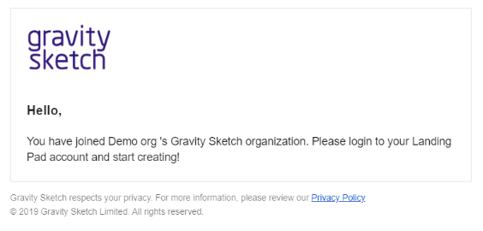
If you're an existing user, you will receive an email confirming that you have been added to the Organisation as an admin.
---
#### Upgrade Members to Admins
Users who are already part of the organisation can have their license upgraded to Admin by the existing Admin.
To upgrade users from a Member to an Admin role:
1\. Go to Members in the Manage section
2\. Select the Members tab
3\. Click on the role of the user and select Admin
-4.png?width=641&height=281&name=mceclip1%20(1)-4.png)
---
#### Admins rights
Admin users have full management rights over the organisations. They:
\- Have full visibility across everything other than files stored in users’ Personal File space.
\- Are the only ones who have access to the Manage section where they can access information about the organisation, set 2FA for the whole organisation, access audit logs, and manage members and teams.
*Note: Admins are only allowed to invite new organizational accounts. They will not be allowed to add Individual accounts which already exist. If you need support to add these users,sers please reach out to support@gravitysketch.com*
-Sep-15-2025-01-22-16-7441-PM.png?width=290&height=466&name=mceclip0%20(2)-Sep-15-2025-01-22-16-7441-PM.png)
\- Have the ability to control who has access to the organization’s LandingPad account, at which level of permission, as well as managing which users are in which teams.
- [Getting started](https://help.gravitysketch.com/getting-started?hsLang=en#main-content)
- [Basic VR Controls](https://help.gravitysketch.com/getting-started?hsLang=en#basic-vr-controls)
- [Starter Resources](https://help.gravitysketch.com/getting-started?hsLang=en#starter-resources)
- [VR Guide](https://help.gravitysketch.com/getting-started?hsLang=en#vr-guide)
- [PC & VR Setup](https://help.gravitysketch.com/getting-started?hsLang=en#pc-vr-setup)
- [Troubleshooting](https://help.gravitysketch.com/troubleshooting?hsLang=en#main-content)
- [Troubleshooting](https://help.gravitysketch.com/troubleshooting?hsLang=en#troubleshooting)
- [FAQs](https://help.gravitysketch.com/troubleshooting?hsLang=en#faqs)
- [What's new?](https://help.gravitysketch.com/whats-new?hsLang=en#main-content)
- [Release Notes](https://help.gravitysketch.com/whats-new?hsLang=en#release-notes)
- [Product Updates & Releases](https://help.gravitysketch.com/whats-new?hsLang=en#product-updates-releases)
- [Creation tools](https://help.gravitysketch.com/creation-tools?hsLang=en#main-content)
- [Explore Workspace](https://help.gravitysketch.com/creation-tools?hsLang=en#explore-workspace)
- [Interact with Objects](https://help.gravitysketch.com/creation-tools?hsLang=en#interact-with-objects)
- [Sketching and Basic Editing](https://help.gravitysketch.com/creation-tools?hsLang=en#sketching-and-basic-editing)
- [Advanced Control](https://help.gravitysketch.com/creation-tools?hsLang=en#advanced-control)
- [SubD Editing](https://help.gravitysketch.com/creation-tools?hsLang=en#subd-editing)
- [File Management](https://help.gravitysketch.com/creation-tools?hsLang=en#file-management)
- [Beta Menu](https://help.gravitysketch.com/creation-tools?hsLang=en#beta-menu)
- [Quick Tips](https://help.gravitysketch.com/creation-tools?hsLang=en#quick-tips)
- [Import & export](https://help.gravitysketch.com/import-export?hsLang=en)
- [Collaboration](https://help.gravitysketch.com/collaboration?hsLang=en#main-content)
- [Collaboration in AR/VR](https://help.gravitysketch.com/collaboration?hsLang=en#collaboration-in-ar-vr)
- [Collaboration on Desktop](https://help.gravitysketch.com/collaboration?hsLang=en#collaboration-on-desktop)
- [Presentation](https://help.gravitysketch.com/collaboration?hsLang=en#presentation)
- [Data & security](https://help.gravitysketch.com/data-security?hsLang=en)
- [Gravity Sketch for businesses](https://help.gravitysketch.com/gravity-sketch-for-businesses?hsLang=en#main-content)
- [Organizations in Gravity Sketch](https://help.gravitysketch.com/gravity-sketch-for-businesses?hsLang=en#organizations-in-gravity-sketch)
- [Enterprise Features](https://help.gravitysketch.com/gravity-sketch-for-businesses?hsLang=en#enterprise-features)
- [Learn Gravity Sketch](https://help.gravitysketch.com/learn-gravity-sketch?hsLang=en#main-content)
- [Certification](https://help.gravitysketch.com/learn-gravity-sketch?hsLang=en#certification)
- [Community](https://help.gravitysketch.com/learn-gravity-sketch?hsLang=en#community)
- [Education](https://help.gravitysketch.com/learn-gravity-sketch?hsLang=en#education)
- [Labs](https://help.gravitysketch.com/labs?hsLang=en#main-content)
- [About Labs](https://help.gravitysketch.com/labs?hsLang=en#about-labs)
[](http://gravitysketch.com)
Copyright © 2026, Gravity Sketch